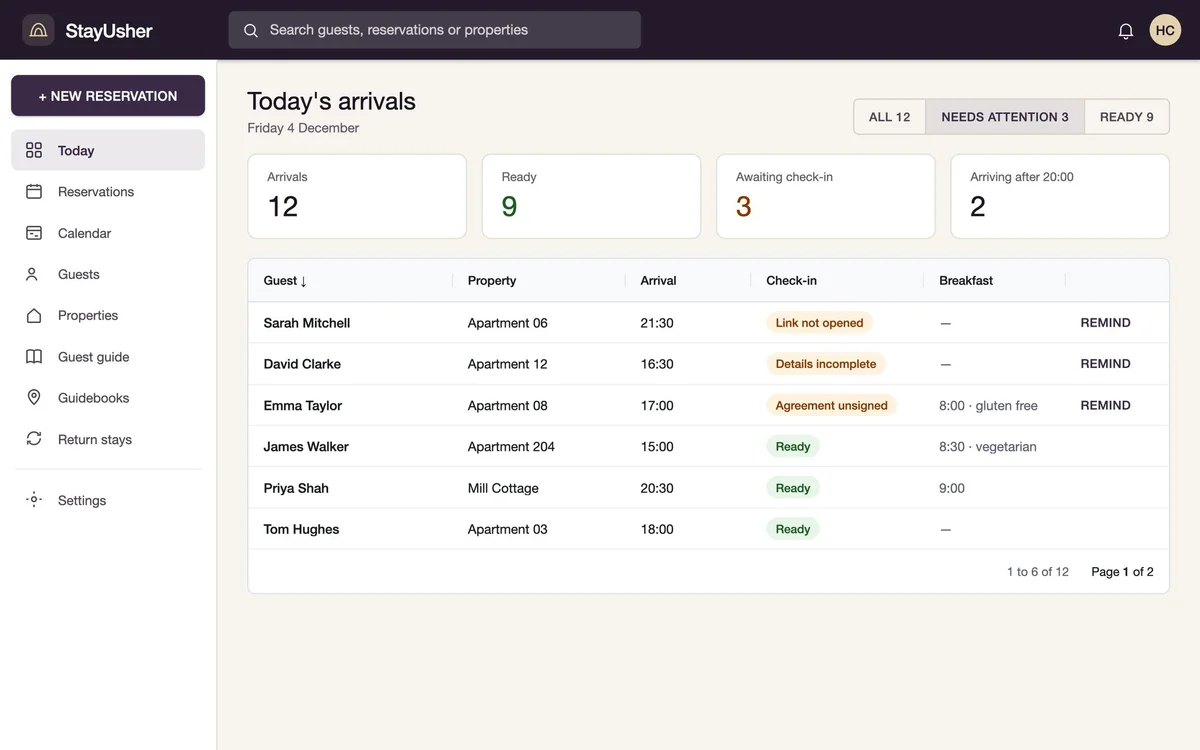
Start with the decision, not another list
At the start of a changeover day, the useful question is simple: which guests need attention? A list of occupied rooms cannot answer it when completed forms, arrival times and unanswered messages live elsewhere.
Hosts often compensate with a handwritten tick beside each name. That works until a reservation changes, a colleague takes over, or a guest completes check-in after the list was printed. The team then spends time reconciling information rather than preparing the welcome.
A guest arrivals dashboard gives the day a common starting point. StayUsher shows arrivals and their check-in progress alongside direct and channel bookings. Use that overview to make decisions, while keeping responsibility for unusual arrangements with a named person.
A practical morning and afternoon routine
- Review the expected arrivals. Compare the day's reservations with any recent changes received through your booking channels. If something is missing, investigate the source and calendar connection before assuming the property is free.
- Separate ready guests from unfinished check-ins. Look at the status on each booking. A guest who has supplied their details needs a different response from someone who has not started.
- Deal with the exceptions. Send a reminder where appropriate. Contact guests personally about an unexpected arrival time or an arrangement that cannot be resolved by completing the form.
- Review again before handover. Check what has changed and tell the next person about outstanding practical arrangements. Use a concise handover note outside the system if your team needs information the dashboard does not record.
What the view helps you decide
Who is due today
Use the daily view to organise immediate arrivals, then the calendar to look ahead. Keeping those decisions separate stops next month's bookings distracting from someone arriving this afternoon.
Who has completed check-in
Check-in status helps you identify missing guest details or agreement acceptance. It is an administrative status, not confirmation that the guest has physically entered the property.
Who needs a reminder
StayUsher supports sending a check-in reminder from the working view. Check recent replies first: a guest who is asking for assistance needs an answer, even if their form remains incomplete.
Which bookings come from different channels
Direct, Airbnb and Booking.com reservations can appear together. The calendar connection guide explains how bookings reach the overview and why feed timing matters. A consolidated display does not make every source update instantaneous.
What still needs a separate operational check
A completed guest check-in does not prove that cleaning is finished, a key safe is working or an early arrival has been approved. Keep those responsibilities explicit. Do not treat the dashboard as a housekeeping or maintenance system.
Two ways independent hosts can use it
A small B&B between breakfast and changeover
Consider a proprietor with three arriving rooms. Two parties have completed check-in, but one has not supplied an expected arrival time. The owner checks the overview after breakfast, follows up with that booking, and plans the afternoon around the response instead of ringing every guest.
An operator with apartments across town
A serviced-apartment team expects arrivals at two buildings. A colleague handling guest messages checks the same booking status before sending reminders. When an apartment change is agreed, the team checks the original reservation and the arrival instructions together so the guest is directed to the correct building.
Follow the notifications into the relevant stay
StayUsher highlights recent completed check-ins, unfinished preparation, new bookings, extra requests and calendar problems. Open the relevant reservation or property to review the event in context.
The notification helps you notice the change; the booking gives you the detail needed to respond. Keep agreements and next actions in the reservation notes so the person covering next can understand what has happened.
Start the day with an arrival summary by email
The host and team can receive an arrivals-today email containing the day's guests and check-in progress. It provides a useful starting point before you open the stays that need attention.
Use the email controls to manage the summary alongside invitations, checkout reminders and review requests.
Questions about the arrivals dashboard
How is this different from calendar sync?
Calendar sync brings reservation information into the system. The arrivals dashboard helps you use it during the working day, especially to identify unfinished check-in. The two are connected, but they solve different jobs: importing bookings and deciding what needs attention.
Does a completed status mean the guest is inside?
No. Guests can complete online check-in before travelling. Door activity and physical occupancy are separate facts. If you need to confirm that someone arrived safely, contact them through the agreed channel.
What should I do if a reservation is missing?
Check the booking source, property mapping and calendar connection. Review recent changes rather than making a second booking immediately. Calendar-feed updates can depend on the systems involved; consult the sync guidance before promising a refresh time.
Can colleagues share the arrival routine?
Choose a plan with the team access you need: Portfolio lists up to five team members, while Hospitality includes unlimited team members and roles. Agree who handles reminders and handovers so two people do not chase the same guest. See current plan inclusions.