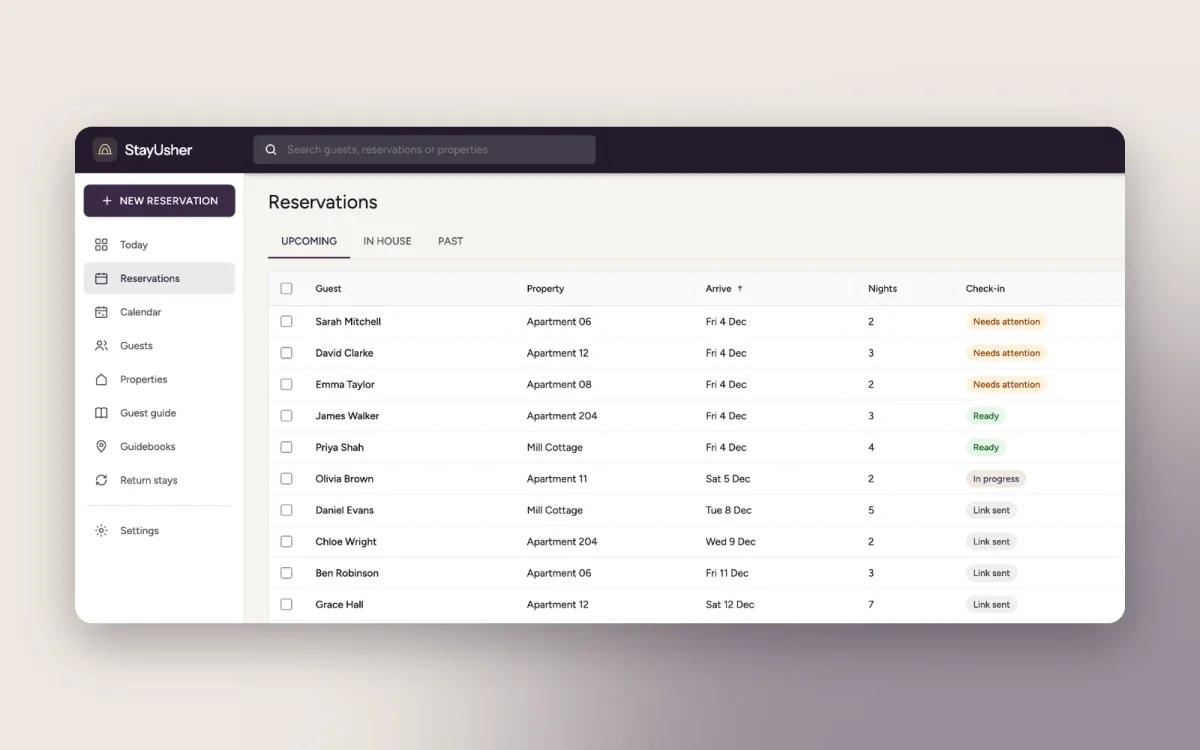
A reservation is the beginning of a guest’s visit. It also becomes the place where dates change, requests arrive and the team agrees how to prepare. Keeping those details together makes a personal welcome much easier to deliver.
StayUsher’s reservation management gives independent hosts a working record for each stay. Add direct bookings, review imported reservations, update the arrangements and connect the guest with their check-in page. Private notes and service requests stay close to the visit they concern.
The purpose is practical. You should be able to open a booking and understand who is coming, where they are staying, what has been agreed and what still needs attention. That is the information behind a considered arrival.
What you can manage on a reservation
The booking connects several parts of the guest experience:
- The property, arrival date, departure date and party size.
- The lead guest and their contact details.
- Check-in progress and the guest’s private link.
- Requests for extras and the host’s decision.
- The local guidebook assigned to that stay.
- Private notes for the people looking after the visit.
These details have different jobs, but they belong together. A change to the dates can affect arrival information. A request for late checkout can affect the next changeover. A private team note can explain an arrangement that would otherwise be buried in a message.
Add direct bookings to the same working view
A booking made by telephone or through a returning guest deserves the same preparation as a channel reservation.
Create the stay with its property, dates and guest details. Add the party size and check the contact information before sending the guest their check-in invitation.
Bringing direct stays into the same view prevents them from becoming a separate set of notes that only one person understands. They can be reviewed alongside the other arrivals and given the same preparation.
For an independent host, this is a useful way to preserve personal booking relationships without making the administration depend on memory. The conversation can remain individual while the confirmed arrangements have a clear home.
Review channel bookings alongside direct stays
StayUsher works with compatible booking calendar feeds to bring upcoming stays into the arrival picture. The reservations list keeps the source visible, so you can understand where the booking originated.
Use the original channel for the wider reservation functions it provides. The StayUsher record helps organise the guest preparation around that stay.
Review the information available from the feed and complete the guest details needed for your arrival process. A calendar event and a fully prepared guest record are different things.
That review becomes especially important for a short-notice booking. Confirm the property, dates and contact route before assuming that the guest has received the information they need.
Find the booking you need without rebuilding the story
The reservations list can be filtered by property and booking source. That helps when you are preparing a particular location or reviewing bookings from one channel.
The app’s search also provides a route to guests, reservations and properties. You can move from a question to the relevant record without working through several unrelated lists.
Once you open the stay, the useful details are brought together. The point is to answer the practical question in front of you: which apartment is booked, whether the guest has finished check-in or what arrangement the team has already made.
Good organisation is most valuable during interruptions. A host who is also preparing rooms needs a clear way back into the context of the visit.
See the shape of the week or month
The calendar offers week, month and agenda views across your properties. Use it to understand how stays overlap, where changeovers fall and what is coming next.
Open a booking from the calendar to work with the reservation itself. The calendar provides the picture across dates; the booking record provides the detail for a particular visit.
That distinction keeps both views useful. You can look ahead to a busy weekend, then inspect the stays that need preparation without treating a date block as the whole story.
For a small collection of properties, a visual calendar can also make a handover easier. Everyone can start from the same understanding of which stays are due, then use the reservation notes for the arrangements that matter.
Update the stay when plans change
Travel plans change. A guest may extend a visit, move to a different property or correct a contact detail. Those changes should reach the working record for the stay.
StayUsher lets you update reservation details, including the property, dates, guest information and party size. You can choose to email the guest their updated check-in link as part of the change.
Review the wider effect of the amendment. A different departure date can affect the next arrival, and a property change can mean different directions or access information.
Keep the source booking arrangement aligned through the systems you use for it. The useful outcome is one clear set of confirmed facts that the guest and the people preparing the property can rely on.
Cancel a stay with a clear end to the guest journey
Cancellation should be a deliberate action, with a decision about whether the guest needs a notification.
StayUsher lets you cancel the reservation and choose to email the guest. The cancelled stay no longer continues as an ordinary upcoming arrival, and its guest link stops providing access to the visit.
Keep any financial or channel arrangements in the processes you already use for them. Cancelling the StayUsher record is part of closing the guest preparation, rather than a promise that every external system has been changed.
For the team, the practical benefit is clarity. A cancelled visit should not remain mixed into the work of preparing the next day’s arrivals or create an unnecessary reminder.
Keep private notes with the booking
Some information concerns one visit rather than the guest in general. You may have agreed a particular handover, arranged where luggage can be left or asked a colleague to check something before arrival.
The reservation’s private notes give that context a place beside the booking. The team can review it when they open the stay.
Write notes that make the next action understandable. Say what has been agreed, who needs to act and which detail matters. A short useful instruction is more valuable than a long transcript of the conversation.
Keep longer-term guest context in the guest profile. Using the two records for their different purposes helps a future visit begin with relevant information rather than an outdated arrangement from last year.
Connect the reservation with guest check-in
The guest link belongs to the stay. From the booking, you can create, copy or send the link that opens the guest’s preparation and information.
Online check-in collects the requested details and agreement acceptance before arrival. The reservation gives the host somewhere to see that progress.
This is more useful than knowing that an invitation was sent. You can distinguish a guest who has finished from someone who needs a reminder or an answer to a question.
When the booking changes, review the preparation alongside it. The guest should find information that reflects the confirmed stay, with a clear route to help if something needs explanation.
Review service requests in the context of the stay
An extra such as early arrival, late checkout or a hamper should be considered against the actual booking.
StayUsher brings guest extra requests onto the reservation. You can review the request and note, then confirm or decline the arrangement.
That context matters. Late checkout depends on the next changeover. A hamper depends on preparation and supplies. A cot needs to be ready in the correct property.
The request should lead to a clear decision rather than becoming another message someone has to remember. You continue handling payment through your existing arrangements, while the booking keeps the service request and the host’s answer connected.
Choose the guidebook that suits the visit
The property can have its usual local guidebook, while an individual stay can be assigned a different one where that is useful.
The reservation’s guidebook control makes the choice visible. You can review which guide the guest will see and change the assignment through the booking.
This gives local knowledge a practical role in preparation. A different location, season or type of visit may benefit from different recommendations.
The guidebook features provide the sections, photographs and place details. The reservation connects that content with the actual guest journey, so the information is part of the welcome you have prepared rather than an unrelated link.
Use reservation details to make team handovers clearer
A small accommodation business can involve several people without having a permanent reception desk. The person answering a message may not be the person preparing the room.
Use the reservation as the common reference for the stay. Check the dates, read the private notes and review the requests before making a promise to the guest.
Agree who is responsible for a particular action. Shared access is useful when it supports a clear handover, rather than leaving several people to assume that someone else has dealt with the question.
Team roles and invitations help you give colleagues access to the business. The reservation record then gives that access a practical purpose: understanding the visit well enough to look after it.
Review the next arrival as a complete visit
Before a busy day, open the stays that are most likely to need attention. Start with incomplete check-in, recent changes and requests that still need a decision.
Check the property assignment and the information the guest will use. Make sure private notes describe the current arrangement, rather than a conversation that has since changed.
Then look at what follows. An extension or late departure may affect another booking. The calendar provides that wider context.
This review is a useful habit because it connects administration with the guest experience. You are preparing a person to arrive at a particular place, with the arrangements that have actually been agreed.
Put direct and returning guests on the same footing
A regular guest can feel familiar enough that their booking never gets written down with the same care as a new enquiry. That creates an avoidable weakness in an otherwise personal relationship.
Add the confirmed stay, check the contact details and use the same preparation record. Recognition can remain warm and individual while the practical arrangements are clear.
The guest profile gives you the history of previous visits. The new reservation gives this visit its own dates, information and decisions.
That combination is valuable for independent hospitality. You can remember the person without assuming that every stay will be identical, and your team can provide a consistent welcome even when the original conversation happened with someone else.
Start with a reservation everyone can understand
Choose a straightforward booking and review it as though a colleague needs to take over tomorrow. Can they identify the guest, the property, the dates and the next action?
Check that the private notes explain any special arrangement and that the guest link points to the correct stay. Review the relevant guidebook and any extra requests.
Then use the calendar to look at the days around it. This is the point where the individual visit meets the wider operation.
StayUsher’s reservation management gives those parts a shared home. The plans page explains how property coverage and team access fit your business. The goal is an organised record that leaves more of your attention available for the welcome.
Questions about reservation management
Can I add a booking taken directly from a guest?
Yes. Add the property, dates, guest details and party size so the stay appears alongside the other arrivals you are preparing.
Can I email a guest when their booking changes?
You can choose to send an updated check-in link after editing a reservation and choose whether to send a cancellation notification.
Are private reservation notes shown to guests?
They are for the people managing the stay. Use the guest-facing property information and your normal communication route for instructions the visitor needs to read.
Does this replace every function of a channel manager?
StayUsher organises the reservation and guest preparation alongside your existing booking arrangements. Keep the source booking system for the wider channel and payment functions you use.