A guest remembers the photograph that made them choose your property. They recognise the name and have a picture of the stay they are looking forward to. The arrival information should feel connected to that choice.
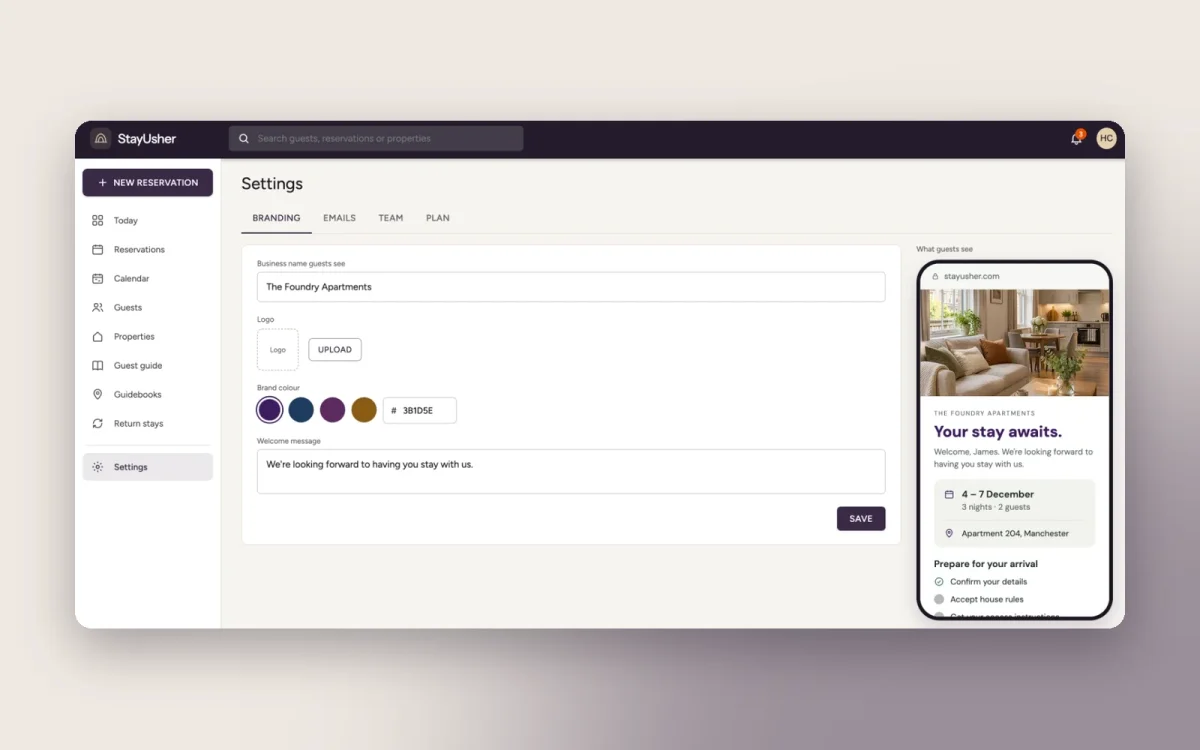
A branded guest portal for independent hospitality gives the visit a recognisable home. It brings check-in and stay information together with your property photographs, logo and colours, so the practical part of the welcome carries the same character as the accommodation.
StayUsher is designed around that continuity. Guests open a browser link to complete their preparation and return for the details they need during the stay. Your own wording and local knowledge make the information useful.
The boutique value is more than an attractive page. It is the feeling that someone has prepared this particular visit, knows the place and has considered what the guest will need next.
Give the stay one recognisable starting point
Arrival information can become fragmented almost without anyone noticing. Parking is explained in one message, the access code arrives in another and the Wi-Fi password appears in a photograph of a printed card.
Each answer may be correct, but the guest has to reconstruct the stay from several places. That is inconvenient when they are travelling and frustrating when they are standing outside with luggage.
StayUsher’s portal gives the visit a reference point. Guests can complete online check-in and find their stay information through the guest link.
The purpose is clarity. A guest should know where to return for an ordinary answer, while you can concentrate on a question that needs personal attention. The portal supports the welcome you have prepared instead of adding another document to an already crowded conversation.
Let the property lead the experience
Independent accommodation often has a distinctive identity. A restored cottage, a small guest house and an apartment in a converted building each offer a different kind of stay.
Use your property photographs, logo and colours to make that identity recognisable. Keep the name consistent with the booking, particularly where several apartments share an address or a site has units with similar names.
The wording should belong to the property too. Explain the details in the voice you would use with a guest. A concise welcome and useful local context can communicate more character than an elaborate introduction.
StayUsher provides the place for that presentation. You supply the knowledge that makes it individual. The result should feel like information prepared by the host who knows the accommodation, rather than a generic page with the property name inserted at the top.
Build the information around the guest’s next question
Before travelling, guests want to understand the journey and the arrival arrangements. At the door, they need the correct entrance and access information. Once inside, they want to settle in.
Organise the content around that sequence. Make the practical essentials easy to identify, then give the wider property information and recommendations a clear place.
A guest looking for the Wi-Fi details should not have to read through several restaurant suggestions. Someone planning an afternoon out should be able to find the local guide without reopening a long arrival message.
This is a useful way to judge what belongs in the portal. Ask which decision a paragraph helps the guest make and when they will need it. Clear organisation is part of the care you give, because it reduces the effort required to enjoy the stay.
Keep check-in within the same welcome
The first guest link has a practical purpose. It asks the visitor to complete the preparation for their stay before arriving.
StayUsher’s online check-in journey collects the requested guest details and agreement acceptance. The guest does not need to create a StayUsher account or install a separate guest app.
Keep the invitation recognisable and explain the action clearly. The property name and stay details help the guest understand why they are receiving the link. The portal then provides continuity with the wider information about the visit.
This matters because administration can otherwise feel detached from hospitality. A form that appears unrelated to the booking creates questions before it answers any. A clear request within a familiar property experience helps the guest understand what happens next and why you are asking.
Make the entrance unmistakable
The most useful property photograph may be the one that helps someone choose the correct door.
Review the arrival from the point where a guest first stops. Can they see the property name or number? Does the entrance match the information they received? Is there a shared door before they reach the accommodation?
Use photographs and short explanations at the points where someone has to make a decision. Identify the residential entrance separately from a shopfront. Explain a side passage rather than assuming the guest will notice it. Name the unit clearly when several doors look similar.
The portal gives you somewhere to prepare those details properly. Your knowledge supplies the answer, but it only helps the guest when it is expressed without relying on the familiarity you already have with the building.
Give access information a deliberate release point
Being able to open the guest portal is different from being ready to receive the access details.
StayUsher releases arrival and access instructions after check-in is complete and the arrival time you configured has been reached. Those conditions connect the handover with the preparation for the actual stay.
Explain the sequence in advance. Guests can complete their check-in before travelling and understand when the access information will become available. An early completed form does not mean the property is ready for an early arrival.
The host supplies and maintains the instructions for the physical access arrangement. If you agree an exception, connect that decision with the relevant guest information. The portal should reflect the handover you have actually prepared, not leave the guest to interpret different messages about the same door.
Help guests settle in during the first few minutes
Once inside, guests usually want a few ordinary answers. They want to put down their bags, connect to Wi-Fi and understand anything that affects the first part of their visit.
Make those answers easy to find. Use the names and descriptions that a new visitor will recognise, particularly for equipment or spaces that are familiar to you but unusual to them.
Keep longer explanations available without putting them in the way of the essentials. A history of the building can be enjoyable after the guest has settled in. It should not obscure the information they need immediately.
The same principle applies to your contact route. Make it clear how someone can reach the appropriate person when a question needs help. Good self-service information and a human response support each other; the portal should make ordinary answers available while leaving a clear route for anything different.
Make the guest house welcome specific
For a B&B or guest house, the portal can help guests understand the arrangements of a shared house before they arrive.
Breakfast is an obvious example. The host may need to know the time guests would like to eat and the dietary requirements they want to share. Breakfast preferences give those requests a place in preparation.
The information guests receive should also explain the relevant spaces and routines. Describe the breakfast arrangements, any shared sitting room and the entrance used for a late return in the terms that apply to the property.
That lets a personal welcome begin from a more informed starting point. You can greet the guest and talk about their plans instead of spending the whole conversation explaining details they could already have understood. The portal supports the house’s way of hosting, with the owner still closely involved.
Prepare cottage and lodge guests for the setting
A cottage or lodge may offer privacy and a distinctive location, but that can make the final approach more complicated.
Use the portal to explain the route in practical terms. Identify the last turning, the parking position and the path to the correct entrance. Separate the postal address from the instructions that actually get someone to the door.
Consider what guests need to know before leaving home. A remote property may require planning for supplies or a particular arrival arrangement. Give that information at a point when it can still help them make a decision.
For holiday cottages and glamping accommodation, the portal should reflect the setting rather than assume a standard hotel arrival. The more individual the location, the more valuable your specific knowledge becomes.
Give apartment guests a clear route through the building
An apartment visitor may need to pass through several access stages before reaching the property. A correct code is less useful if they are trying it at the wrong door.
Distinguish the building entrance from the apartment door. Explain the floor, lift or staircase, and any parking arrangement in the order the guest will encounter them.
Use photographs that identify the actual approach. An attractive interior confirms the property once someone is inside; a street-level entrance image helps them reach it.
The serviced apartment arrival guide covers this sequence in more detail. The portal gives those instructions a home that remains available during the stay, alongside the information someone needs when returning to the building later.
Share local knowledge with your own point of view
Guests often choose independent accommodation because it promises a connection with the place. Your recommendations can make that connection practical.
A digital local guidebook should explain the choices you would suggest in person. Give the restaurant a reason to be there. Describe which walk suits a short afternoon and where to find the practical information before setting out.
Keep recommendations separate from arrival essentials so that each has room to do its job. Someone at the door needs to get inside; someone planning tomorrow can take time to explore your advice.
That is the boutique value of the portal. It brings your knowledge into the guest experience, with enough structure to make it useful. A considered selection of suggestions can make a visit feel more personal than a long list with no explanation behind it.
Keep the departure information easy to find
The final morning should not require another search through old messages. Guests need to know the checkout time and the arrangement for returning keys or leaving the property.
Put that information with the rest of the stay details. Explain the actions that matter to the handover in a short, specific sequence.
If a key needs to return to a particular box, identify it clearly. If parking or a shared entrance affects departure, explain the relevant arrangement rather than assuming the guest remembers every detail from arrival.
A well-prepared checkout is part of the same welcome. It helps the guest finish the visit with confidence and gives the next changeover a clearer starting point. The portal’s value continues through the whole stay, rather than ending when the door first opens.
Keep the property information current
Someone needs to own the accuracy of the portal. A changed Wi-Fi password, parking arrangement or access code should trigger a review of the information guests receive.
Check the related instructions together. A new entrance description may also affect a photograph or a saved arrival message. The guest should encounter one clear arrangement across the information you supply.
When a change affects an imminent arrival, communicate it directly to the guest and confirm the relevant details. Do not leave an urgent correction dependent on someone discovering it by chance.
The portal gives information a manageable home, but the care is in keeping it connected to the property as it is now. This is a practical task for an independent host, and a much easier one when the ordinary details are organised instead of scattered across several versions.
Offer a useful companion for essential details
The full portal holds the wider journey and the explanations around the stay. Sometimes a guest only wants one or two facts again.
Apple and Google Wallet passes, included on the relevant plans, offer another format for selected essentials such as access information, Wi-Fi and checkout time.
Keep the roles clear. The portal is where the guest completes check-in and reads the fuller property information. A saved pass is a convenient way to carry a small set of stay details on a compatible device.
For locations with uneven reception, prepare the guest before the final approach. Ask them to review the necessary information while connected and use a practical backup for the arrival. The portal and pass should support the journey you actually expect them to make.
Test the portal before the next stay
Open the guest experience on a phone and work through it without using your existing knowledge of the property.
Can you identify the correct accommodation? Is the check-in action clear? Do the entrance instructions make sense from the street? Can you find the Wi-Fi and departure time without searching through unrelated material?
Ask someone unfamiliar with the place to repeat the exercise. Notice where they hesitate and improve that point. A better heading, a clearer photograph or one extra sentence can make a practical difference.
Then use the questions guests actually ask to keep improving the content. The portal should become more useful because it reflects real visits, rather than simply becoming longer. Thoughtful editing is part of the hospitality.
Choose a guest experience that carries your character
Every StayUsher plan includes the branded guest portal as part of the core check-in journey. Your photographs, logo and colours belong in the welcome from the start.
The pricing page explains the differences in guidebooks, Wallet passes, team access and other features. Choose around the properties you manage and the way you want to prepare each stay.
StayUsher’s focus is independent hospitality: professional organisation that keeps the host’s care visible. Our comparison pages explain that position against broader guest experience and reservation platforms.
Prepare the information once, make it recognisably yours and keep improving the details that help guests. The portal should feel like part of the property they chose and the welcome you want to give.
Questions about branded guest portals
Is the portal a separate website project?
It is part of the StayUsher guest experience. You provide the property branding and information rather than commissioning a separate website for each stay.
Do guests need a StayUsher account?
No. They open the guest link in a browser, without creating a guest account or installing a separate app.
Can the same approach work for direct and channel bookings?
Yes. The portal belongs to the stay you prepare in StayUsher. Send the guest link through the communication route you use for that reservation.
Can the portal replace the need for a host contact?
Keep a clear contact route alongside the ordinary information. The portal makes routine answers available, while the host remains responsible for questions and arrangements that need personal attention.